Bambuddy: Open-Source Self-Hosted Print Management for Bambu Lab
Bambu Lab’s Dominance Comes with Cloud Lock-In
Bambu Lab has quickly become one of the most influential names in desktop 3D printing. With machines like the A1, P1S, and X1 Carbon, the company has delivered printers that combine speed, quality, and ease of use in ways that were previously rare at consumer price points. For many makers, Bambu Lab printers are simply the best tools for the job.
But there’s a recurring point of friction in the Bambu Lab ecosystem: its reliance on cloud services. To use the full feature set — remote monitoring, cloud slicing, multi-printer management — you need a Bambu Lab account, and your print data flows through the company’s servers. This cloud-centric model has drawn criticism from privacy-conscious users, security researchers, and open-source advocates. What happens when Bambu Lab changes its terms, suffers an outage, or restricts third-party access?
The 3D printing community has responded the only way it knows how — by building alternatives. Projects like the Bambuddy open-source project on GitHub are emerging to give Bambu Lab printer owners full local control over their machines, without any cloud dependency. And the early results are impressive.
What Is Bambuddy?
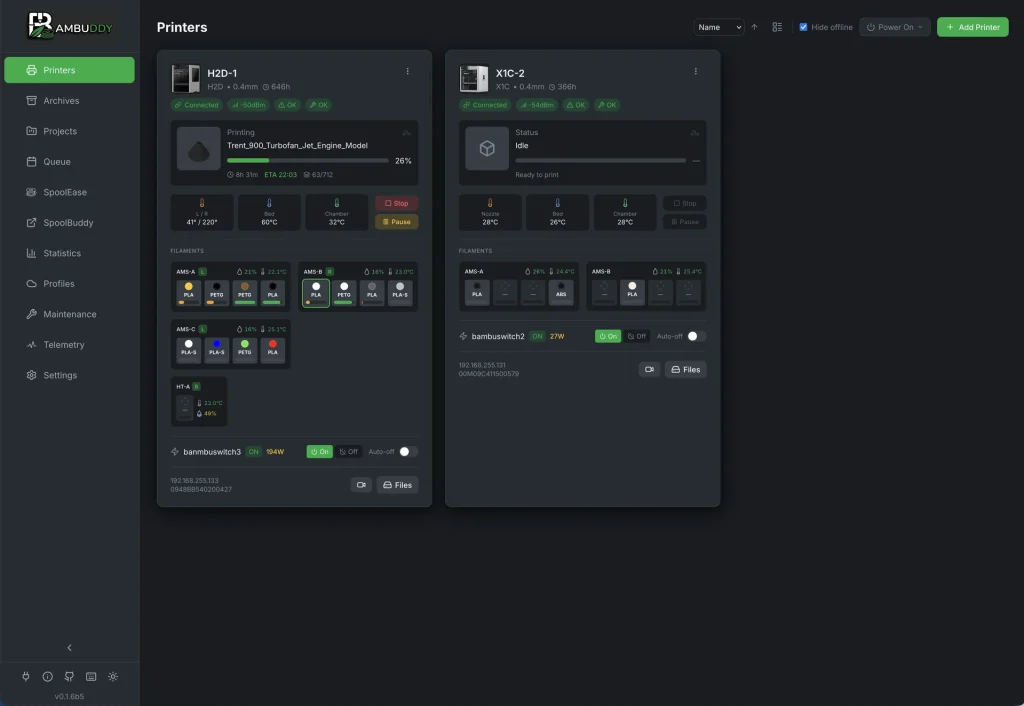
Bambuddy is a self-hosted, open-source command center for Bambu Lab 3D printers, developed by Martin (maziggy) and released on GitHub. It runs entirely in Docker on your local network, meaning no cloud accounts, no external data routing, and no mandatory internet connection for day-to-day use.
The project is designed to scale with your needs. Whether you’re running a single A1 on your workbench or managing a 40-printer production farm, Bambuddy provides a unified web-based dashboard to monitor, control, and schedule prints across all connected machines. It’s the kind of tool that power users and small print shops have been asking for since Bambu Lab first gained popularity.
Key Features of Bambuddy
What makes Bambuddy stand out isn’t just that it’s open-source — it’s the breadth of functionality it delivers. Here’s a breakdown of the major features:
Web-Based Dashboard
Bambuddy provides a clean, responsive web interface for managing your Bambu Lab printers. You can view printer status, send jobs, monitor progress, and review print history — all from a browser on any device on your local network.
No Cloud Dependency
All data stays local. There’s no account registration required, no telemetry sent to external servers, and no risk of feature loss if an internet connection drops. For users concerned about privacy or data sovereignty, this is a significant advantage.
Integrated Server-Side Slicing
Perhaps the most headline-grabbing feature: Bambuddy includes built-in server-side slicing. You don’t need a desktop slicer application — you can slice models directly from your browser or even from a phone. This means you can prepare and send print jobs from any device on your network, which is a genuine departure from the typical slicer workflow.
Re-Slicing Across Printer Types
Bambuddy can re-slice a model for different printers, including across single-nozzle and dual-nozzle boundaries. If you have a mix of AMS-equipped machines and simpler setups in your fleet, you can adapt a single project for any target printer without starting from scratch.
Remote Printing via Proxy Mode
For remote access outside your local network, Bambuddy offers a Proxy Mode with TLS encryption. It also supports Tailscale integration, giving you a secure, private tunnel to your printers without exposing them directly to the internet. This is a thoughtful approach to remote management that prioritizes security.
Slicer Pipelines
Bambuddy introduces “Slicer Pipelines” — saved combinations of printer, process, and filament presets that you can reuse with one click. For anyone running repeated jobs or standardized production runs, this feature alone can save significant time.
Multi-Printer Dispatch and Scheduling
Need to distribute jobs across multiple machines? Bambuddy supports multi-printer job dispatch, AMS (Automatic Material System) routing, and scheduled printing. For print farms, this kind of centralized orchestration is essential.
PWA Support
The progressive web app (PWA) support means you can install Bambuddy on your phone or tablet for a native-like experience. Slice, send, and monitor prints from anywhere in your workshop.
Why It Matters for Print Farms and Power Users
The implications of a tool like Bambuddy extend well beyond hobbyist convenience. For small print farms and production-oriented users, cloud lock-in isn’t just an inconvenience — it’s a business risk. If Bambu Lab’s cloud goes down, restructures its pricing, or changes its API access policies, print operations that depend on it can grind to a halt.
Bambuddy addresses this by keeping everything local and open-source. A print farm running Bambuddy on a Docker host can operate entirely on its own local network, with remote access handled through encrypted tunnels. The tool scales from a single printer to dozens, with centralized management that gives operators visibility across their entire fleet.
As XDA-Developers noted, Bambuddy is “the companion app that Bambu Lab should have built from day one.” Fabbaloo went further, observing that its “features seem to exceed those provided by Bambu Lab’s own cloud.” And 3Druck.com highlighted that the “list of functions seems so extensive that it even goes beyond what Bambu Lab offers.”
These aren’t small claims. The fact that an open-source community project is outpacing an established manufacturer’s official software speaks volumes about the priorities of the maker community — and about the demand for user-controlled alternatives in 3D printing.
Building the Print Farm of the Future
The 3D printing industry is moving toward more connected, more automated workflows. But connectivity doesn’t have to mean dependence on a single vendor’s cloud. Open-source tools like Bambuddy demonstrate that local-first architectures can deliver the same — or better — functionality without sacrificing privacy or control. For anyone evaluating Bambuddy against Bambu Lab’s native cloud, the comparison increasingly favors the open-source option.
If you’re running a print farm or managing Bambu Lab printers at scale, the landscape of available tools is expanding rapidly. The combination of reliable hardware and open-source software gives users options that didn’t exist even a year ago.
Need Help with Your 3D Printing Project?
At TT3DPrint, we specialize in custom 3D printing services — from rapid prototyping to small-batch production. Whether you’re working with Bambu Lab printers, FDM, SLA, or need help selecting the right materials for your project, our team can help. Get in touch to discuss your requirements and find out how we can support your workflow.
Conclusion
Bambuddy represents a significant step forward for Bambu Lab printer owners who want local control, privacy, and farm-scale management without cloud lock-in. Built in Docker, offered under an open-source license, and already attracting attention from major 3D printing publications, Bambuddy is a project worth watching — and worth trying if you’re looking to take full ownership of your printing workflow.
As the 3D printing community continues to build open alternatives to proprietary ecosystems, tools like Bambuddy remind us that the best software often comes from the people who actually use it. Keep an eye on the project’s GitHub repository for updates, and stay tuned to our blog for more coverage of the tools shaping the future of 3D printing.
Sources: Bambuddy GitHub Repository | XDA-Developers | Fabbaloo | 3Druck.com